Jun 1, 2023 3:02 AM UTC
Solved

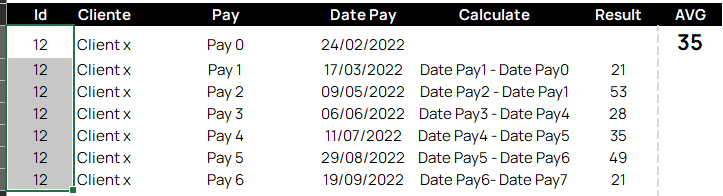
How to calculate the average interval of days between payment activities?The calculation is represented below:

midia

Answer
Jun 1, 2023 1:24 PM UTC

Hi Ariane,


To calculate the difference between rows, you should use the LAG (celonis.com) function here. Assuming that your table only contains the payment rows, your code will be (please ignore bullets, I need them for indention)


  • DAYS_BETWEEN (
    • "<Table>"."Date Pay", -- Get date of current row
    • LAG (
      • "<Table>"."Date Pay" -- Get date of previous row
      • , ORDER BY ( "<Table>"."Date Pay" ) -- Sort on dates
      • , PARTITION BY ( "Table1"."Id" ) -- Only look for previous rows with the same ID
    • )
  • )


I do still not understand what you mean with average, since to calculate this, no average is needed?

14 replies

Jun 1, 2023 3:10 PM UTC

Hi Ariane,


To calculate the difference between rows, you should use the LAG (celonis.com) function here. Assuming that your table only contains the payment rows, your code will be (please ignore bullets, I need them for indention)


  • DAYS_BETWEEN (
    • "<Table>"."Date Pay", -- Get date of current row
    • LAG (
      • "<Table>"."Date Pay" -- Get date of previous row
      • , ORDER BY ( "<Table>"."Date Pay" ) -- Sort on dates
      • , PARTITION BY ( "Table1"."Id" ) -- Only look for previous rows with the same ID
    • )
  • )


I do still not understand what you mean with average, since to calculate this, no average is needed?

I will try this reply, I back with news, very thanks guys!

Jun 1, 2023 7:11 PM UTC

I guess she wants the average time of all the cases selected.

In that regard, combine both answers and you should be there! :)

Jun 1, 2023 7:11 PM UTC

Oii guys, I got with the formula that @janpeter.van.d​ suggested applied the average before for the KPI, it was like this:

  • (AVG(DAYS_BETWEEN("CHANGE_CATEGORIZADA_Planilha1"."TIMESTAMPLE",
    • LAG ("CHANGE_CATEGORIZADA_Planilha1"."TIMESTAMPLE"
    • ORDER BY ( "CHANGE_CATEGORIZADA_Planilha1"."TIMESTAMPLE" DESC)
    • PARTITION BY ("CHANGE_CATEGORIZADA_Planilha1"."ACTIVITY","tabela_cliente_Sheet1"."TABELAFRENTE")))))


Jun 1, 2023 7:12 PM UTC

Thank you very much!