
Solved

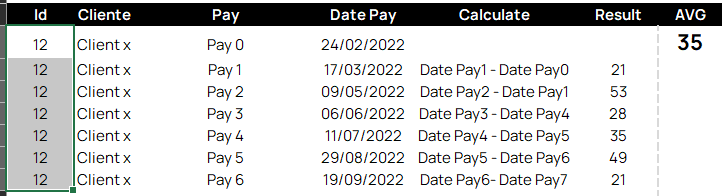
How to calculate the average interval of days between payment activities?The calculation is represented below:

  • June 1, 2023
  • 14 replies
  • 0 views

midia

Best answer by Anonymous

Hi Ariane,


To calculate the difference between rows, you should use the LAG (celonis.com) function here. Assuming that your table only contains the payment rows, your code will be (please ignore bullets, I need them for indention)


  • DAYS_BETWEEN (
    • "<Table>"."Date Pay", -- Get date of current row
    • LAG (
      • "<Table>"."Date Pay" -- Get date of previous row
      • , ORDER BY ( "<Table>"."Date Pay" ) -- Sort on dates
      • , PARTITION BY ( "Table1"."Id" ) -- Only look for previous rows with the same ID
    • )
  • )


I do still not understand what you mean with average, since to calculate this, no average is needed?

14 replies

  • June 1, 2023

@Nicholas Masters​ 


  • June 1, 2023

@1460056167​ 


  • June 1, 2023

Hi @ariane.reis​,


If you have already a column or PQL KPI (in your Studio knowledge model or as saved formula in your Studio Analysis) that calculates the value in the result column, this is quite simple to solve.


We want to make an aggregration on ID here, and therefore we have to use a PULL-UP function. If ID is in the same table, use the following code:


PU_AVG(

DOMAIN_TABLE("<table_name>"."Id"), -- Aggregate on "Id"

"<table_name>"."Result" -- Take average of "Result"

)


Note that if "Result" is calculated in another PQL KPI, refer to this KPI here: using KPI("<KPI NAME>")


More about PU function can be found here: Pull Up Aggregation (celonis.com)


  • June 1, 2023

Hi @janpeter.van.d​ Thank you very much for the reply!


Maybe I couldn't explain it right, but I'd like to calculate exactly the difference between these payment dates, i.e. I don't have the results column.


Do you think you can help me? Please!


  • June 1, 2023

The information of payment date is in the case table or in the activities table?

I mean, maybe you have an activity "payment 0", other "payment 1", etc... or an activity "payment" with another column called "number"


  • June 1, 2023

Oi @Guillermo Gost minhas informações estão na tabela de atividades, vc acha que isso é problema?


  • June 1, 2023

In summary, this is the payment process and I need to calculate the average time between payments.


  • Answer
  • June 1, 2023

Hi Ariane,


To calculate the difference between rows, you should use the LAG (celonis.com) function here. Assuming that your table only contains the payment rows, your code will be (please ignore bullets, I need them for indention)


  • DAYS_BETWEEN (
    • "<Table>"."Date Pay", -- Get date of current row
    • LAG (
      • "<Table>"."Date Pay" -- Get date of previous row
      • , ORDER BY ( "<Table>"."Date Pay" ) -- Sort on dates
      • , PARTITION BY ( "Table1"."Id" ) -- Only look for previous rows with the same ID
    • )
  • )


I do still not understand what you mean with average, since to calculate this, no average is needed?


  • June 1, 2023

Hi Ariane,


To calculate the difference between rows, you should use the LAG (celonis.com) function here. Assuming that your table only contains the payment rows, your code will be (please ignore bullets, I need them for indention)


  • DAYS_BETWEEN (
    • "<Table>"."Date Pay", -- Get date of current row
    • LAG (
      • "<Table>"."Date Pay" -- Get date of previous row
      • , ORDER BY ( "<Table>"."Date Pay" ) -- Sort on dates
      • , PARTITION BY ( "Table1"."Id" ) -- Only look for previous rows with the same ID
    • )
  • )


I do still not understand what you mean with average, since to calculate this, no average is needed?

I guess she wants the average time of all the cases selected.


  • June 1, 2023

I guess she wants the average time of all the cases selected.

Exatamente


  • June 1, 2023

Hi Ariane,


To calculate the difference between rows, you should use the LAG (celonis.com) function here. Assuming that your table only contains the payment rows, your code will be (please ignore bullets, I need them for indention)


  • DAYS_BETWEEN (
    • "<Table>"."Date Pay", -- Get date of current row
    • LAG (
      • "<Table>"."Date Pay" -- Get date of previous row
      • , ORDER BY ( "<Table>"."Date Pay" ) -- Sort on dates
      • , PARTITION BY ( "Table1"."Id" ) -- Only look for previous rows with the same ID
    • )
  • )


I do still not understand what you mean with average, since to calculate this, no average is needed?

I will try this reply, I back with news, very thanks guys!


  • June 1, 2023

I guess she wants the average time of all the cases selected.

In that regard, combine both answers and you should be there! :)


  • June 1, 2023

Oii guys, I got with the formula that @janpeter.van.d​ suggested applied the average before for the KPI, it was like this:

  • (AVG(DAYS_BETWEEN("CHANGE_CATEGORIZADA_Planilha1"."TIMESTAMPLE",
    • LAG ("CHANGE_CATEGORIZADA_Planilha1"."TIMESTAMPLE"
    • ORDER BY ( "CHANGE_CATEGORIZADA_Planilha1"."TIMESTAMPLE" DESC)
    • PARTITION BY ("CHANGE_CATEGORIZADA_Planilha1"."ACTIVITY","tabela_cliente_Sheet1"."TABELAFRENTE")))))


  • June 1, 2023

Thank you very much!